Perfect Viewer
- 4.4
- Rating
- 5.00M
- Installs
- Free
- Price

 Analysis by App-foxy
I spent time with Perfect Viewer as a dedicated comics and image-reading app, and my first impression was that it is built for people who care more about control than decoration. It feels like a practical tool for opening, sorting, and reading image-based comics rather than a social platform or a storefront. That distinction matters: if you want a polished service that recommends titles and syncs a reading library automatically, this is not the same kind of product. If you already have comic files and want a fast way to view them, the approach makes much more sense.
The app is free, aimed at everyone, and comes from Rookie001. Its long presence on Android is reflected in its release history, beginning on October 2, 2010, while the current version is 5.0.4.4. The minimum operating-system requirement is Android 4.0, which makes it unusually accessible for people using older hardware. At the same time, that broad compatibility hints at the app’s character: it is a mature utility that has accumulated practical reading controls instead of chasing a completely new visual identity.
How Perfect Viewer feels in everyday use
Reading a comic on a phone is not simply a matter of opening an image. Pages may be tall, wide, double-page spreads, or stored inside an archive. A good viewer needs to make those formats comfortable without forcing the reader to fight the interface. Perfect Viewer’s strength is that it treats these details as central rather than incidental. I found it most convincing when I used it as a personal library tool, where the goal was to open a file quickly and keep reading with as little interruption as possible.
You May Also Like

 AccuWeather: Weather Radar
AccuWeather Review: A Quick, Clear Forecast for Everyday Decisions
For everyday plans, the best forecast is the one you can understand quickly. AccuWeather makes rain timing, radar, and local conditions easy to act on, with a few trade-offs.

 Hill Climb Racing
Why Hill Climb Racing Still Turns Crashes Into One More Run
A tiny car, a bumpy hill and one more upgrade: Hill Climb Racing keeps resurfacing because its simple chaos makes every near-miss feel personal.

 AliExpress - Shopping App
AliExpress Makes Global Shopping Feel Personal, but Shoppers Bear the Risk
AliExpress turns a global marketplace into a pocket-sized discovery engine. Its reach is useful, its shopping loop compelling, and its trade-offs easy to miss.

 Lords Mobile: Kingdom Wars
Lords Mobile Is a Kingdom-Building Routine, Not a Quick Match
A case-by-case verdict on the building, battles, device demands, and social commitments that make Lords Mobile rewarding for some players and exhausting for others.

 PDF Scanner app - TapScanner
TapScanner Makes Paperwork Easier to Capture, Check, and Share
TapScanner makes scanning with a phone feel less like a rescue operation and more like a dependable step in getting work done. Its capture tools are useful, though not flawless.

 Block Blast!
Block Blast! Shows How Much a Puzzle Game Can Leave Out
A quiet grid game shows why puzzle players increasingly value instant clarity, repeatable skill and low-pressure play—and where the genre still needs to catch up.
More From Our News Desk
View All News


The app’s store summary calls it a powerful and fast image and comics viewer, but that description only becomes meaningful when you consider the likely workflow. You can think of it as a reading layer between your files and your screen. It is useful for someone who transfers comics to a phone, keeps image collections locally, or wants an app that handles more than one page orientation. It is less useful for somebody who expects a catalog of licensed books, cloud recommendations, or a built-in subscription service.
Navigation is where a specialized viewer earns its place. A casual gallery application may show comic pages, but it normally treats each page as an isolated photograph. Perfect Viewer is designed around continuity. That makes page-to-page movement, zooming, and orientation decisions more relevant than the usual gallery features. For long reading sessions, this difference is more important than a flashy home screen.
I also like the fact that the app does not try to turn reading into a social activity. There is no need to browse posts, follow creators, or pass through a recommendation feed before reaching the file I want. That directness is refreshing when I already know what I plan to read. The trade-off is equally clear: the app will not replace a digital comics marketplace or a discovery-focused reading service.
Who benefits most from the controls
Perfect Viewer is a strong match for readers who keep comics in different formats and want one familiar interface. It can also suit users with older Android devices, provided those devices can still handle their own files comfortably. The broad operating-system support is helpful for a spare phone, an inexpensive tablet, or an older device used mainly for reading.
It is particularly practical for people who read translated comics, independent releases, scanned material, or personal image collections. Those readers often need a viewer rather than a store. They may also appreciate being able to organize their own folders instead of being limited to a provider’s catalog structure. I would recommend trying it first if your priority is local control and flexible viewing.
On the other hand, I would not choose it as my first recommendation for a reader who wants an effortless, curated experience. Services built around official digital comics usually make purchasing, syncing, and discovering books easier. Their interfaces may be more modern and their libraries more convenient, even if they offer fewer options for handling arbitrary image archives. Perfect Viewer’s advantage begins after you already have something to read.
A realistic reading routine
Imagine downloading several chapters before a train journey and placing them in a clearly named folder on an older Android tablet. With a general photo app, each page may appear as a separate picture, and returning to the correct chapter can become tedious. In Perfect Viewer, the useful routine is to open the collection as a reading session, adjust the page display for the device, and continue through the material without treating every page as an unrelated photograph.
That workflow is also helpful at home. I might keep a folder for a series, another for one-shot comics, and a third for reference images. Instead of importing everything into a cloud service, I can leave the files where I understand them and use the viewer to read them. This is one of the app’s less obvious strengths: it respects a file-based reading habit rather than requiring the user to rebuild a library inside a separate ecosystem.
There is a practical caution here. File organization still matters. A viewer can make reading easier, but it cannot fix a chaotic collection with unclear names and duplicate chapters. I would spend a little time naming folders consistently before importing a large library. That small effort pays off later, especially when returning to a series after a break.
Where its older design helps and hurts
The app’s age is not automatically a weakness. A product that has been available since 2010 has had plenty of time to become familiar to long-term users, and its low minimum system requirement makes it approachable on hardware that newer apps may ignore. The current 5.0.4.4 version shows that the project is still maintained as a usable product rather than being abandoned in its original form.
Still, the experience can feel more utilitarian than contemporary reading apps. New users may need patience while learning where viewing preferences and library actions are located. A highly configurable tool often exposes more choices than a person wants on the first day. I would not judge it only by the first few minutes; the value comes from shaping it around your habits. But I also would not pretend that this learning curve disappears for everyone.
This is an important trade-off. A simpler viewer may feel immediately comfortable, yet become frustrating when a comic needs a different page direction or a more deliberate browsing method. Perfect Viewer asks for more attention at the beginning in exchange for more control later. Whether that is worthwhile depends on how often you read image-based comics and how varied your collection is.
What has changed and what existing users should expect
Because the app has reached version 5.0.4.4, I see it as a mature tool rather than an experimental viewer. The version number is useful context, but it should not be mistaken for a promise that every part of the interface feels modern. Product evolution can mean improved stability, compatibility, or continued maintenance without completely redesigning the experience. For existing users, the most sensible expectation is continuity: the app remains focused on viewing rather than expanding into an unrelated comics ecosystem.
That continuity is valuable when you have already built a reading routine around local files. A major redesign can disrupt folder browsing, gesture habits, or the way a reader remembers where a series is stored. Perfect Viewer’s established identity makes it easier to keep using the same general approach over time. I would still check the application after an update instead of assuming every preference behaves exactly as before, particularly if you rely on a carefully tuned reading setup.
The app’s popularity also gives some reassurance that it is not an obscure experiment. It has more than five million installs, an average rating of 4.2 from roughly fifty-eight thousand ratings, and about three thousand three hundred written reviews. Those figures do not guarantee that it will suit a particular device or reading style, but they do show that a substantial Android audience has found the concept worthwhile.
For someone moving from an older phone to a newer one, the sensible approach is to recreate the reading environment gradually. Start with a small selection of files, confirm that page movement and display behavior feel right, and then bring over the rest of the collection. This avoids blaming the app for problems caused by an unfamiliar screen size, an awkward folder structure, or files that were already difficult to read elsewhere.
Useful habits that are easy to overlook
One of my favorite ways to use a configurable viewer is to separate “reading mode” from “inspection mode.” For normal comics, I want a stable display and minimal interruptions. For art books, reference sheets, or unusually wide pages, I am willing to zoom and inspect details. Treating those as different tasks helps prevent constant adjustment. Perfect Viewer makes more sense when you use its flexibility deliberately instead of changing every option for every file.
A second useful habit is to test a difficult page before committing to a long session. Choose a file with small lettering, a wide spread, or a tall page and see how it behaves on your phone. This quickly reveals whether the app’s controls match your preferences. It is a better test than opening a single ordinary page and assuming the entire collection will feel identical.
A third insight concerns storage and travel. Keeping a manageable offline selection can be more comfortable than carrying an entire library into the app at once. A smaller folder is easier to browse, easier to back up, and less likely to bury the chapter you actually want. Perfect Viewer works well with that intentional approach because it does not require you to treat every file as part of one giant online catalog.
There is also a benefit for mixed collections. If you use your device for both comics and general images, a specialized viewer can reduce the temptation to rearrange everything around the limitations of a photo gallery. I would keep personal photographs in the gallery and use Perfect Viewer for reading material. That division makes each app’s purpose clearer and avoids turning a normal photo library into a confusing comic archive.
The gaps that may matter to you
The biggest limitation is not necessarily a missing button; it is the app’s basic premise. Perfect Viewer expects the user to bring the content. If you want a ready-made selection of official comics, account-based purchases, or a service that remembers your library across multiple platforms, another option will probably be better. This app is a viewer first, and that means content discovery is largely your responsibility.
The same independence can create extra work. You may need to manage folders, move files, and decide how chapters should be named. Readers who enjoy organizing their own collection may see that as freedom. Readers who want everything handled automatically may see it as friction. Neither reaction is wrong; it depends on whether file management feels like part of the hobby or an obstacle before the hobby begins.
There is a similar compromise in the interface. A tool with many viewing possibilities can be more adaptable than a minimalist reader, but it may take longer to understand. I would skip Perfect Viewer if I know I will only read occasional comics and strongly prefer a single obvious button for every action. A simpler app may be more pleasant for that narrow use case.
Screen size also changes the experience. On a phone, zooming and page layout decisions matter much more than they do on a tablet. Perfect Viewer can help you manage the material, but no software can make tiny lettering comfortable on a small display without some compromise. If you mostly read detailed pages, a larger screen or a service optimized for reflow and panel-by-panel reading may suit you better.
How it compares with common alternatives
Compared with a standard gallery, Perfect Viewer is the more appropriate choice for sequential reading. A gallery is excellent for browsing individual photographs, but comics depend on order, continuity, and comfortable page movement. The specialized app gives the reading task priority, while the gallery usually leaves you to create that experience yourself.
Compared with an official comics platform, the balance reverses. A platform with a built-in catalog is usually easier for discovering and acquiring new books. It may also provide a smoother account-based experience. Perfect Viewer wins when the files are already yours, when you want to read material outside a single provider, or when older Android compatibility and local control matter more than storefront convenience.
Compared with a minimalist comic reader, Perfect Viewer is likely to appeal to the person who wants more say over how pages are displayed and browsed. The cost of that flexibility is a little more setup and a less immediately streamlined feeling. I would choose the minimalist alternative for occasional reading and Perfect Viewer for a collection that I expect to revisit.
What I would watch before committing
If I were installing it today, I would pay attention to three things during the first session: how quickly I can reach a folder, how comfortable the default page behavior feels, and whether the controls remain out of the way while reading. Those checks reveal more than the app’s feature count. A powerful viewer is only useful if its power does not interrupt the story.
I would also watch how well my own library fits the app. Test a normal chapter, a wide page, and a collection with several folders. If all three feel manageable, the app is probably a good match. If the folder structure feels burdensome or the reading controls require constant correction, a simpler or more service-oriented alternative may save time.
My overall opinion is favorable, with a clear condition: Perfect Viewer is best for readers who want control over local comics and images, not for readers looking for a complete digital comics service. It is free, broadly compatible, established, and focused on the practical act of viewing. Its age gives it useful maturity but also a more utilitarian feel than some newer alternatives. I would recommend it to anyone building a personal Android comic library, especially on older hardware. I would skip it only if convenience, discovery, automatic syncing, and a polished storefront matter more to me than flexible file-based reading.
FAQs for Perfect Viewer
01What is Perfect Viewer and what features does it offer?
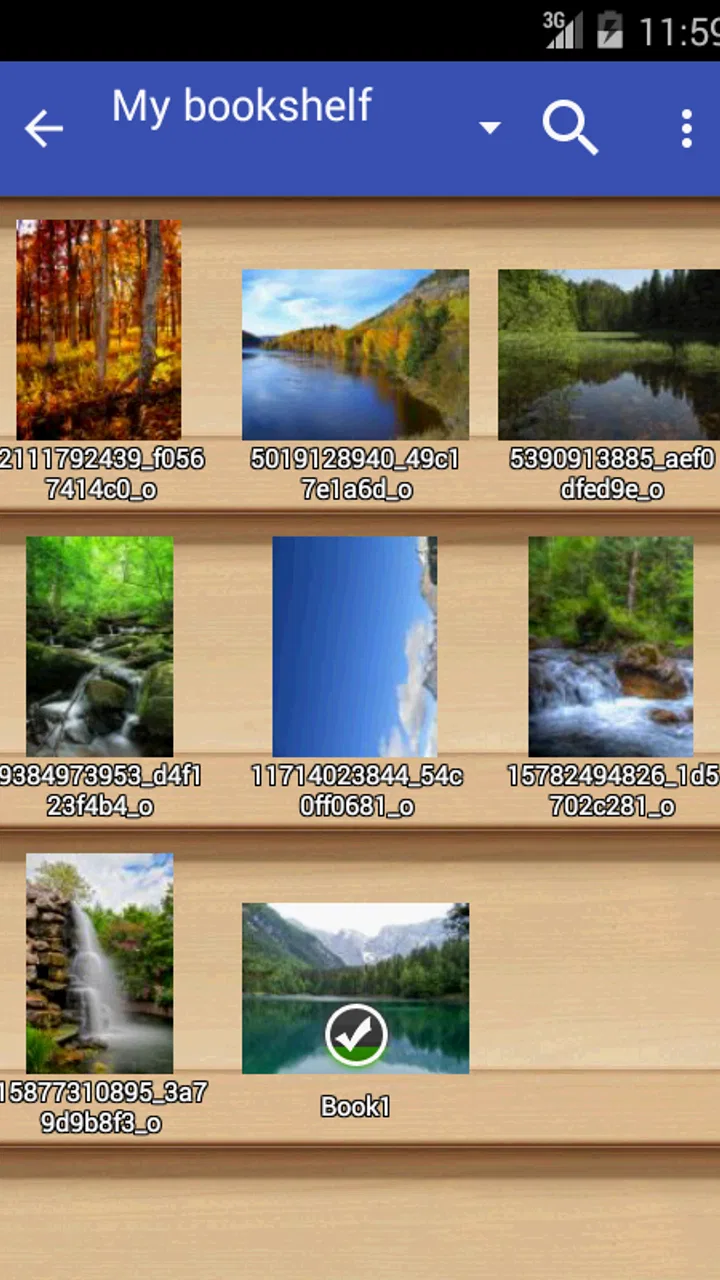
Perfect Viewer is a versatile comic and eBook reader for Android devices. It supports a wide range of file formats such as CBZ, CBR, PDF, and more. The app offers customizable viewing options, including multiple reading modes, zoom settings, and bookshelf organization. It also supports plugins for additional features like cloud storage access.
02Is Perfect Viewer free to use, and are there any in-app purchases?
Perfect Viewer is free to download and use. While the main features are available at no cost, there are optional plugins that can be purchased to enhance functionality. These plugins might include additional format support or cloud storage integration, allowing users to tailor their reading experience to their specific needs.
03What are the system requirements for installing Perfect Viewer on an Android device?
To install Perfect Viewer, your Android device should be running at least Android 4.0 or later. Ensure that you have sufficient storage space for the app and any eBooks or comics you wish to store. A device with decent processing power will enhance the overall reading experience, especially when handling large files.
04How does Perfect Viewer handle different file formats and what are the supported types?
Perfect Viewer supports a variety of file formats, making it a versatile choice for reading. It can handle CBZ, CBR, PDF, JPEG, PNG, BMP, GIF, and more. This wide compatibility ensures that users can open and read almost any comic or eBook they come across without needing to convert files.
05Can I customize the reading experience in Perfect Viewer?
Yes, Perfect Viewer offers extensive customization options for a personalized reading experience. Users can choose from different viewing modes like single page or dual page, adjust zoom levels, and configure page transitions. The app also allows for theme customization, ensuring that users can set up the app interface to match their preferences.
Pros
- Highly customizable interface options.
- Supports a wide range of file formats.
- Smooth and fast page transitions.
- Bookmarking feature for easy navigation.
- Low battery consumption during use.
Cons
- Limited cloud storage integration.
- No built-in store for comics.
- Occasional crashes on large files.
- Updates are infrequent and minor.
- User interface may feel outdated.

Perfect Viewer
Gallery